
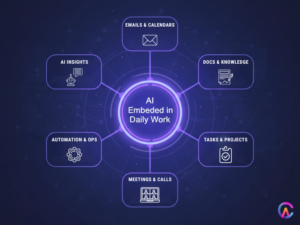
AI tools in 2026 have evolved beyond mere assistants, they’re now essential team members, seamlessly managing planning, writing coordination, and analysis. This allows humans to concentrate on strategy, creativity, and building relationships. The most effective tools aren’t necessarily the flashiest, they’re the ones that integrate AI into everyday tasks like emails, calendars, documents, meetings, and automations, where the minutes saved can add up to hours each week.
Here’s a look at the top AI tool categories and standout platforms that will enhance productivity in 2026, along with how Codearies supports companies in adopting and building on these tools.
1 AI orchestration and workflow automation
The biggest productivity gains in 2026 will come from connecting existing tools rather than cluttering your workspace with yet another app. AI powered workflow platforms will link together CRMs, emails, documents, chats, and internal systems, using AI to determine the best actions to take and when.
Key tools and benefits
- Zapier AI
This tool connects hundreds of apps and now includes AI actions, allowing workflows to branch based on natural language reasoning. For instance, it can read an email, assess whether it’s a lead, summarize it, and automatically input it into a CRM without needing custom code. - Make n8n and Power Automate
These platforms provide advanced automation options for teams that require more control, integrating AI steps like classification, summarization, and data extraction into complex workflows.
What this means for productivity
- Tedious tasks like copying data, sending updates, and tagging items will fade into the background.
- Non technical teams can create automations simply by outlining their goals, letting AI suggest the necessary steps.
2 AI agents and digital coworkers
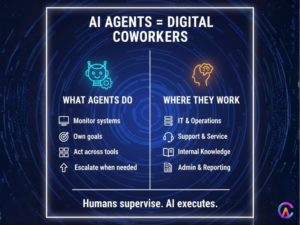
AI agents represent a significant leap from basic chatbots, they function as dedicated digital workers capable of setting their own goals, monitoring systems, and interacting with various tools. Experts forecast that by 2026, we could see hundreds of millions, if not billions, of AI agents integrated into enterprise software.
Where AI agents shine
- IT and operations
These agents keep an eye on logs and metrics, opening tickets or even resolving common issues before anyone notices there’s a problem. - Customer and employee support
Brand concierge agents tackle routine inquiries, escalate more complex situations, and allow human teams to concentrate on the trickier challenges. - Internal data access
Agents can respond to questions using company knowledge, transforming wikis, tickets, and documents into conversational interfaces.
Productivity impact
- Humans transition from performing tasks to overseeing and guiding agents, significantly boosting their overall capacity.
3 AI meeting assistants and communication helpers
Meetings and communication can easily take up most of our days. Thankfully, AI tools now manage scheduling, recording, transcription, and follow ups, allowing teams to focus on making decisions.
Notable tools
- Fireflies Avoma and similar assistants
These tools record calls, transcribe them, generate action items, and automatically push notes to CRMs and project management tools. - Copilot for Outlook Gmail Gemini and Shortwave
They summarize lengthy email threads, suggest replies, and highlight important dates or requests to help reduce inbox clutter.
Upsides
- Less time spent on manual note taking and status updates.
- Quicker onboarding, as new team members can review high quality summaries instead of sifting through raw recordings.
4 AI knowledge management and enterprise search
Information overload can stifle productivity. Modern AI search and knowledge tools link wikis, tickets, chats, and files into a cohesive semantic layer, providing answers in natural language.
Leading platforms
- Glean and Guru
These platforms unify search across SaaS tools, delivering context rich answers instead of just lists of links. - Notion AI Confluence with AI and SharePoint Copilot
They transform documentation spaces into dynamic systems with inline summarization, Q&A, and automatically generated action lists.
Benefits
- Staff spend less time searching for information and more time utilizing it.
- Institutional knowledge becomes reusable instead of stuck in silos or individual heads.
5 AI writing content and research copilots
Writing remains the go to method for work, and AI writing and research tools are making the processes of drafting, editing, and investigating much faster and easier.
Standout tools
- ChatGPT Claude Gemini and similar general models
These tools are great for brainstorming outlines, drafting emails, proposals, and documentation, as well as analyzing complex documents. - Jasper Writer Notion AI
These focus on marketing and context driven writing, utilizing brand voice libraries, style guides, and predictive performance scoring.
Productivity advantages
- Teams can go from a blank page to a polished draft in just minutes.
- Specialists can dedicate more time to judgment and strategy instead of getting bogged down in first drafts.
6 AI scheduling time blocking and personal productivity
Some of the most effective tools are those quiet time managers that sit in calendars, reorganizing days based on priorities, deadlines, and energy levels.
Key examples
- Motion Reclaim and Akiflow
These tools automatically schedule tasks, block out meeting times, and allocate deep work periods while adapting to real time changes. - AI assistants in Google Workspace and Microsoft 365
They suggest focus time and help prioritize tasks based on upcoming projects and workload.
Why this matters
- Workers can avoid the mental strain of manual planning.
- Teams can align around shared priorities without endless back and forth communication.
7 AI project and work management
Project management tools are now integrating AI to summarize status updates, highlight risks, and propose next steps, transforming static boards into proactive copilots.
Representative tools
- Asana AI Monday AI ClickUp Brain
These generate project briefs from goals, group tasks, suggest owners, and identify blockers before they can derail timelines. - Jira with Atlassian Intelligence
This helps engineering teams prioritize issues, understand sprint health, and connect problems to code changes.
Outcomes
- Managers receive reliable, auto generated updates instead of having to chase down manual reports.
- Teams gain clearer visibility into priorities and dependencies amidst complex projects.
8 AI design video and creative studios
Content heavy roles are really benefiting from AI tools like video generators, image editors, and design assistants that can transform ideas into assets at lightning speed.
Examples
- Runway Descript and other video tools
They allow you to edit using text prompts, whipping up B roll, captions, and transformations in just minutes. - Canva with AI and presentation tools like Gamma
Draft slide decks from outlines and reshape designs automatically.
Impact
- Marketing teams can launch more campaigns without needing to grow their headcount linearly.
- Even those who aren’t designers can produce polished visuals while staying within brand guidelines.
9 AI search and research browsers
AI enhanced search engines and browsers are also stepping up their game, merging web results with reasoning to deliver synthesized answers instead of endless pages of results.
Tools to watch
- Perplexity Brave AI Komo and others
They provide conversational search capabilities, complete with citations and follow up questions for in depth research tasks.
Benefits
- Analysts and strategists can spend less time gathering links and more time on interpretation and decision making.
10 Industry specific AI platforms
Lastly, industry specific AI tools are packing specialized knowledge into platforms tailored for support, sales, HR, finance, and development.
Examples
- Sales and CRM AI
There are tools that can score leads, draft outreach messages, and summarize calls right within CRMs. - HR and people analytics
Platforms can screen applications, summarize performance histories, and suggest learning paths, all while ensuring compliance. - Dev and IT operations
AI copilots work alongside code repositories and logs to help debug issues, propose patches, and automate runbooks.
These specialized solutions often yield the quickest return on investment because they optimize established workflows and metrics.
How Codearies helps you leverage and build AI productivity tools
Codearies is all about helping businesses move past just dabbling with random AI apps. Instead, they focus on creating comprehensive AI enabled workflows and custom tools that lead to real, lasting productivity improvements. Rather than simply picking tools from a list, Codearies emphasizes the importance of architecture integration and effective change management.
What Codearies does for AI productivity in 2026
-
AI workflow and agent design
Codearies takes a close look at your workflows to enhance operations in marketing, product development, finance, and more. They pinpoint where AI agents and automations can seamlessly take over tasks from start to finish, utilizing platforms like Zapier, AI LLMs, and internal APIs.
-
Custom AI copilots and agents
Their team crafts personalized copilots for your knowledge base, CRMs, dashboards, or back office systems. This way, your staff can ask questions in natural language and trigger actions based on your own data and rules, all while keeping things secure.
-
App and platform integration
Codearies makes it easy to connect AI tools with your existing stack, think Gmail, Outlook, Slack, Teams, Notion, Asana, Jira, and your internal CRMs and ERPs. This means your team can access AI right where they already work, without the hassle of jumping between different apps.
-
Data governance and security
They design architectures that prioritize the safety of sensitive data, establishing clear boundaries between public models, private deployments, and on premises or VPC hosted inference, tailored to your specific risk profile.
-
Training and adoption
Codearies also provides support for teams through playbooks, prompts, and enablement sessions. This ensures that employees know which tools to use, when to use them, and how to collaborate effectively with AI, rather than feeling like they’re fighting against it.
With this approach, AI tools transform from shiny experiments into integral parts of a cohesive system that boosts productivity throughout your organization.
FAQs
Q1: Which AI tools are expected to deliver the quickest productivity boosts in 2026?
The most significant improvements usually come from AI driven workflow automation, email and meeting assistants, and knowledge search tools, as they benefit all roles and help save time on a daily basis.
Q2: Will AI agents take over jobs?
AI agents are set to take on more repetitive digital tasks, but insights from companies like Google and Cisco highlight the importance of hybrid models where humans and AI work together, allowing people to focus on more valuable tasks rather than being completely replaced.
Q3: Can Codearies create custom AI tools instead of just using SaaS products?
Absolutely, Codearies can develop tailored copilots, dashboards, and agents built on open models or enterprise platforms, seamlessly integrating them with your existing systems and packaging them into secure web or mobile applications designed specifically for your workflows.
Q4: How does Codearies decide which AI tools to integrate for a client?
Codearies evaluates your technology stack, compliance requirements, and objectives, then chooses a combination of reliable AI platforms, including orchestration tools, LLMs, and specialized applications, connecting them through APIs and automation layers to prevent tool overload.
Q5: How long does it take to see results from an AI productivity initiative with Codearies?
Targeted projects, like automating a support queue or conducting sales research, often yield noticeable time savings within a few weeks of implementation. In contrast, larger, multi team transformations typically unfold over several months as workflows and training evolve.
For business inquiries or further information, please contact us at